Building The House of Knowledge: RAG on a Budget
Part 1 of a series on building a real RAG system with real data - cheap as possible, no fancy GPU, hardly any RAM and to be honest totally unsuitable hardware.
I’d seen all the AI hype.
Fancy technology, amazing hardware. All the RAM and Nvidia graphics chips you could throw at it. The demos were always fairly boring. “Chat with your docs”, “Organise your life”, “Boil the ocean”. All of it was contrived; I don’t have docs, a life or a spare ocean. All very clean and tidy. Well, until it deleted your production DB whilst apologising.
Still, I wanted to build something with it. Something I might actually use, with data I actually care about.
I’ve been playing in a Dungeons & Dragons campaign for years. Like the software engineering nerds we are, we keep reasonably good notes in a shared Obsidian vault. Notes going back a few years: full sessions, important characters, locations, loads of context. I’d already turned this into a wiki site hosted on GitHub Pages. It seemed like the right place to start.
Anyone familiar with Neverwinter will know The House of Knowledge, an archival institution that keeps all known lore, available to be consulted by any adventurer to force their DM to make something up on the spot. This project is that, but for our campaign: weird interpretations of published canon, wacky character arcs and all. The goal is simple: ask it a question about the campaign, get a useful answer with citations back to the original notes.
This post covers how I built it, the hardware it runs on, and where I hit constraints. Subsequent posts will look at making it accessible over the internet, the Bedrock Converse API, the choice of LLM, and agentic RAG. This is where it starts.
The hardware constraint
Before getting into fancy AI techniques, we need to set out the baseline that shaped every decision. This all runs on a little Intel NUC server box that sits in my flat. It’s mostly used as a NAS, a storage server for DVD rips. It’s always on, running Arch Linux, now with this app running inside Docker.
- Intel Core i3-7100U (dual-core, 2017 vintage, 2.3GHz)
- 8GB RAM
- No discrete GPU
Not exactly AI workload hardware. It was old when I bought it and now it’s older still. I tried to buy more RAM for it the other day and nearly fell over at the price; the current shortages are even hitting hardware this old. But it’s what I’ve got, it uses hardly any electricity, and as is a theme in this series, I’m not spending money if I can help it.
The decision to use this hardware makes a lot of choices for you. Local LLM generation isn’t happening; there’s no GPU. That one constraint eliminates a bunch of options and points you straight at an architecture I’m used to: run the easy stuff locally, offload the hard work to a cloud API.
It also makes you care about RAM in a way that tutorials don’t prepare you for. When I hit 5GB RAM during reindexing, on a machine with 8GB total, that’s not a theoretical concern. It’s a question of whether anything else on the machine stays alive.
The fan situation doesn’t help. When reindexing runs, the NUC sounds like it’s preparing for takeoff. CPU maxes out for a couple of minutes. The first time it happened I thought something had gone wrong. It hadn’t. That’s just what it sounds like when a 2017 i3 tries to embed 769 text chunks.
Version 0: the prototype that proved the concept and nothing else
For my first attempt I built a version on my old gaming PC. Also not exactly recent hardware, but it does have an AMD RX5600 GPU to speed things up a little. It used LangChain, Ollama, and DeepSeek-R1 for generation, with FAISS for vector search. It worked, sort of.
Getting it running was straightforward enough. LangChain handled the retrieval pipeline, Ollama ran DeepSeek-R1 locally on the GPU, FAISS handled vector similarity search. Getting something that answered questions about the campaign notes came together quickly.
“Worked” is generous though. This version was a command-line Q&A loop: you typed a question, it printed an answer. No UI, no history, no filters, answers capped at four sentences. Chunking was naive fixed-size (1000 characters, 200 character overlap) with no awareness of document structure, so it would split an NPC’s backstory mid-sentence and retrieve half of it. DeepSeek-R1 wasn’t chosen for its reasoning capabilities; I’d just read an article about it the week before.
The other problem was that nobody else could use it. It required SSH access to my gaming PC, a specific terminal session, and the ability to read raw model output. Useful for me, on that one machine, when I could be bothered turning it on.
Whatever came next had a few problems to solve.
The data: what we’re working with
The notes live in an Obsidian vault on iCloud, shared across the whole group so everyone can contribute edits between sessions. They’re also published to a Quartz static site on GitHub Pages.
The vault covers several categories: Sessions, People, Places, Organisations, Factions, Bad Guys, Monsters, Props. Session notes carry the most information: what happened, who was there, what was said, what decisions were made, and what loose threads are now dangling. The older session notes are rougher; we weren’t as diligent back then. All now have a consistent structure with a YAML frontmatter block:
---
date: 2026-05-26
title: 2026-05-26
session: 38
tags:
  - neverdeath
  - raven-queen
  - kyusse-nihal
  - jorund-arc
  - ultrin-arc
---
The tags track story arcs. This matters for filtering: if someone wants to know what’s happened in the Jorund arc specifically, they don’t want chunks from sessions where Jorund barely appeared. The metadata makes scoped queries possible without rewriting the retrieval logic.
Getting notes onto the NUC is done with an rsync script that runs from my laptop, pushes the vault over SSH, and triggers reindexing. It’s a manual trigger: no file watching, no automation. That’s deliberate. The notes don’t change that often, and I’d rather run the sync intentionally than have it kick off unexpectedly. The reindex noise alone is reason enough.
Embeddings: the choice that matters for retrieval quality
A lot of RAG tutorials gloss over this, but it matters. Not all embeddings are equal. The model you use to convert text into vectors determines what “similar” means when you retrieve chunks. That then determines whether the system finds the right context to answer your question.
The prototype used DeepSeek-R1 for embeddings as well as generation, because that’s what I had running. In hindsight this wasn’t ideal: generation models are optimised for producing coherent text, not for producing embeddings that cluster semantically related passages together. A dedicated embedding model outperforms a repurposed generation model for retrieval.
For the rebuild I used BGE-M3, a multilingual dense retrieval model from the Beijing Academy of AI. It comes up consistently near the top of retrieval benchmarks and supports long context, which is useful when individual sections of campaign notes can run to a few hundred words. I considered all-MiniLM-L6-v2 (snappy name) as it’s faster and lighter, but retrieval quality won out and BGE-M3 is better on paper.
The trade-off is RAM. BGE-M3 is not a small model. It idles at around 1GB inside the container, peaking at roughly 5GB during a reindex. Worth bearing in mind if you’re even more constrained than me.
The model is baked into the Docker image at build time rather than downloaded on first run, which speeds up startup slightly. Embeddings run entirely on CPU. This explains the fan.
Chunking: structure-aware beats fixed-size
Fixed-size chunking is the default in most RAG tutorials because it’s simple. Split the document every N tokens with some overlap, done. For documents without meaningful structure, it’s fine.
For structured Obsidian notes, it’s the wrong approach. These documents are organised by headings. Each ## or ### section has a specific semantic purpose: a character, a location, an event. Splitting mid-section because you’ve hit a token limit throws away that structure and produces chunks that aren’t coherent units.
The current system splits on ## and ### headings, strips YAML frontmatter first, and assigns each chunk an ID of {filepath}#{slug}. Empty or very short sections get discarded. Every chunk corresponds to a meaningful section of a note: when the system retrieves a chunk about Ultrin’s history with forbidden magic, it gets the full section, not the first half of it.
ChromaDB is used as the vector store. Instead of searching text for matching keywords, it converts each chunk into a list of numbers that encode its meaning, then finds chunks whose numbers are closest to your query’s. ChromaDB is an open-source vector database built specifically for this use case. It runs embedded: no separate server process, no external dependencies, no network calls. It starts with the container and persists to a local directory. The search uses an HNSW index with cosine similarity. At the size of our knowledge base, the performance characteristics are basically irrelevant. This choice was made for ease.
Generation: keep it local until you can’t
The NUC handles everything up to and including retrieval: embedding the query, searching ChromaDB, returning the top-k chunks. None of that requires a powerful computer; it’s just matrix multiplication and a similarity search.
Generation is where that breaks down. The system offloads it to AWS Bedrock, with two model options in the UI:
| Model | Input | Output |
|---|---|---|
| Amazon Nova Lite | $0.06 / 1M tokens | $0.24 / 1M tokens |
| Anthropic Claude Haiku 4.5 | $1.00 / 1M tokens | $5.00 / 1M tokens |
Nova Lite is roughly 17x cheaper on input, 20x cheaper on output. For a hobbyist project with low query volume, both cost pennies in practice, but the difference matters when running evaluations or batch comparisons, which later posts will cover.
I’ve used Bedrock rather than the Anthropic API directly for flexibility. Bedrock’s Converse API is a unified interface: the same call shape works for Nova, Claude, and any other model available on Bedrock. Switching models is a single config change. This is what makes model comparison easy later in the series: same code, same prompts, different modelId.
Token usage is tracked in a local SQLite database after every query, with monthly rollups. There’s a second Streamlit page just for viewing spend. Since part of the point of running this locally is to save money, I wanted to know what it actually costs at normal use (session queries, the occasional deep-dive), not what it costs in demo conditions. I don’t want surprise cloud bills.
The full architecture
Notes live in Obsidian on iCloud. A script on my laptop pushes the vault to the NUC over rsync and kicks off reindexing. The Docker container runs the full local stack: BGE-M3 embeds notes on CPU, ChromaDB stores the vectors on disk. When a question comes in through the Streamlit UI, the query gets embedded locally, ChromaDB retrieves the nearest chunks, and those chunks along with the question and the last 8 messages of conversation history go to AWS Bedrock for generation.
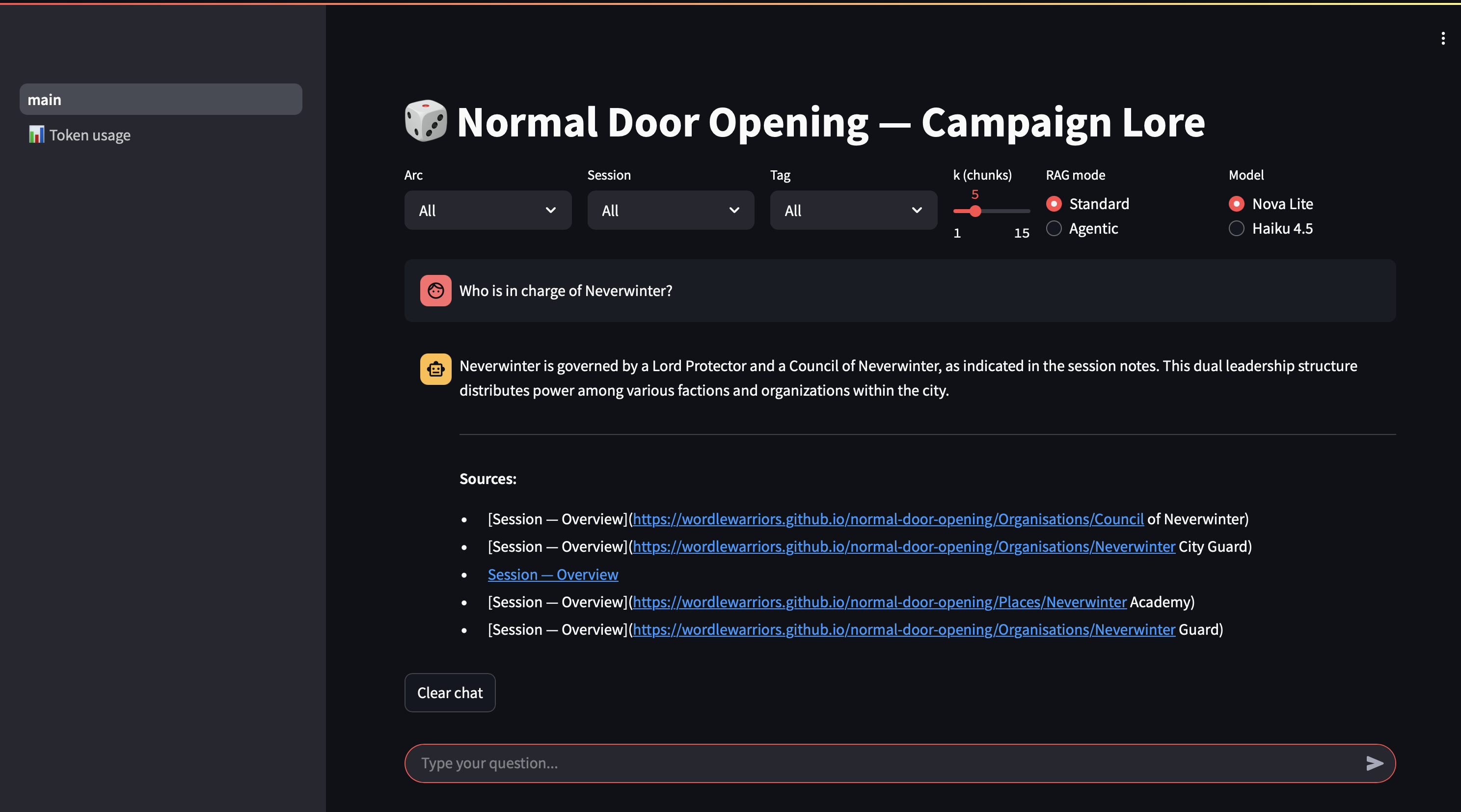
The Streamlit UI has a chat interface, a model selector, a mode toggle for standard vs agentic RAG (more on that later), and filters by arc, session, and tag. Citations in the response link back to the Quartz wiki. The whole thing runs inside Docker, and a later post will cover getting it accessible from outside the house without a static IP.
Does it work though?
The group’s first proper test question was: “Who is the most untrustworthy member of the party?”
This was asked as a joke. The system does not do jokes:
Based on the session notes, I cannot provide a clear, canon answer to this question. The notes contain numerous instances of characters expressing concern about individual party members’ trustworthiness, but these are specific to context and relationship rather than establishing a definitive ranking.
Jorund is concerned about Ultrin’s use of forbidden magic and whether he should be trusted with knowledge of Nihal (Session 37)
Ultrin himself has moments suggesting internal conflict — he experiences intrusive thoughts about lich spells (Session 38) and writes cryptic notes in his own hand that he doesn’t remember (Session 36)
Merric and Aust have concerns about Ultrin consulting “the forbidden book” during the ritual (Session 34)
If you’re asking which party member has demonstrated the most questionable judgment or alarming behaviour, Ultrin would be the strongest candidate based on his engagement with forbidden magic — but this reflects his methods more than inherent untrustworthiness.
No single chunk could have answered that. The system pulled evidence from four separate sessions, hedged where the notes didn’t support a definitive conclusion, and still arrived at a reasoned answer. The answer is also, as far as anyone at the table is concerned, correct. Ultrin does have some issues.
That’s what made the prototype worth rebuilding. Fixed-size chunking and a generation model doing double duty as an embedder would have struggled with that question: either retrieving the wrong chunks or not enough of them. Structure-aware chunking, a proper embedding model, and a capable generation model made the difference.
What’s next
This post lays the foundation: the hardware, the motivation, the data pipeline, and the core retrieval and generation setup. The rest of the series builds on this.
Next up is the Bedrock Converse API: a closer look at the unified interface that makes multi-model setups straightforward, with code examples showing exactly how the call is structured and how conversation history works. After that: getting the system accessible from outside the house, automating publishing with Quartz, the Nova Lite vs Haiku 4.5 comparison on real campaign queries, and eventually agentic RAG.
The code is published here. Feel free to take a look.
Normal Door Opening is an ongoing D&D 5e campaign. The characters’ questionable actions are their own.