Teaching the Scribe: Automating D&D Session Notes with Claude
Part 4 of the House of Knowledge series. Part 1 is here.
The session notes get written during the game. Someone types as we go, so they’re reasonably accurate. What never happens is the cleanup afterwards. Nobody writes a recap at midnight when the session ends. Nobody tags the NPCs or flags the loose threads. The notes land in Obsidian exactly as they were typed, and there they stay.
Part 1 mentioned 87 (and counting) session notes of inconsistent quality feeding the RAG system. This post is about the thing that fixes that. It’s a Claude skill that reads a session note and patches structured blocks into it: a recap, an NPC log, open threads and frontmatter the indexer can use. This is AI tooling cleaning up the data that feeds a different AI system.
The problem is the cleanup, not the writing
The raw notes are accurate enough. What’s missing is everything that should happen after the session ends.
Players who missed a session want to know what happened. They don’t want to read a stream-of-consciousness log typed in real time. They want three sentences.
The start of every session has the same ~five~ ~fifteen~ twenty five minutes of “so what were we doing again?” A clean recap, accessible from a phone, removes that.
Then there’s the House of Knowledge. It runs on ChromaDB chunks, and inconsistent notes make inconsistent retrieval. An NPC who shows up once with no surrounding context is a retrieval dead end. Structured frontmatter, a recap, and a proper NPC log make the whole system more useful. The enrichment is doing data quality work as much as it’s doing summarising.
Being able to muck about with the RAG side is just a bonus. The recap and the open threads are worth generating even if nothing was indexing the notes at all.
What the skill does
It adds structured blocks to a note without touching the original content. It reads the note, synthesises it, and patches in:
- YAML frontmatter: date, arc tags, NPC list, items list, session number.
- A recap: three to five sentences on what actually happened, not a transcript.
- Open threads: unresolved questions and plot hooks flagged for next time.
- An NPC log: who’s new, the status of who isn’t, relationship notes.
- An items log: loot, significant objects, anything that changed hands.
- Arc tags: which ongoing story arcs the session touched.
The model synthesises rather than copies. The recap should read like someone who was there and understood what mattered, not a bullet list of events. Getting that right is most of the work in the prompt.
How it’s built
The skill runs inside Claude. It uses the Obsidian MCP to read the note and write the enriched version back. Three operations, in order:
obsidian:list_directoryfinds the most recent session note.obsidian:read_notepulls the full content.obsidian:write_note, in overwrite mode, writes frontmatter plus the enrichment block plus the original note, in that order.
The skill itself is a SKILL.md file. It’s a structured prompt that tells Claude the workflow, the output format, and the edge cases. Here’s the shape of the workflow section:
### Step 1 — Identify target session(s)
- If the user says "latest", call obsidian:list_directory on Sessions/
  and pick the highest date.
- For batch operations, confirm the count with the user before proceeding.

### Step 4 — Generate the enrichment block via API call
Read references/system-prompt.md to get the system prompt, then make a
focused API call with the raw note as the user message.
Parse the ARC_TAGS: line from the response to extract arc tags,
then remove that line before writing.

### Step 6 — Write back to the vault
Reconstruct the note as:
  <frontmatter block>
  <enrichment block>
  ---
  <original note content verbatim>
Use obsidian:write_note with mode: overwrite.
There’s a second file, references/system-prompt.md, that holds the campaign context and the arc tag list. That gets passed as the system prompt in a focused call to generate the enrichment block:
You enrich D&D session notes by generating a structured enrichment block.
Return only the enrichment block — no preamble, no explanation.

**Known arc tags** (use only these — never invent new ones):
`#merric-arc` `#aust-arc` `#jorund-arc` `#neverdeath` `#raven-queen` ...

Rules:
- Never invent facts. Every item must be traceable to the note.
- Use [[double brackets]] for all named NPCs, locations, and items.
- Keep language concise and present-tense (except Recap, which is past tense).
The split is deliberate. SKILL.md holds the mechanics: what to do, in what order, how to handle the awkward cases. The system prompt holds the campaign-specific knowledge. If the campaign changes, you edit the system prompt. If the workflow changes, you edit the skill. Neither edit touches the other.
There’s no separate process or glue code sitting between Claude and Obsidian. The skill manipulates the notes directly through MCP, and the logic that decides what goes in the enrichment block lives in the prompt.
The frontmatter is what the machine reads
The YAML block at the top is what makes a note machine-readable:
---
session: 42
date: 2026-05-15
arc_tags:
  - #the-council-crisis
  - #missing-cartographer
npcs:
  - name: Aldric Vane
    status: introduced
    notes: City watch captain, suspicious of the party
items:
  - Sealed letter from the Cartographers' Guild
  - Aldric's badge (taken)
---
Arc tags are slugs rather than prose, because “The Council Crisis”, “Council Crisis”, and “council-crisis” are otherwise three different filters. NPCs carry a status field, one of introduced, recurring, dead, or unknown, so the log behaves like a tracker rather than a list. Items is a flat list, because the model handles “significant objects” better than it handles a rigid type system.
The indexer reads the frontmatter when it chunks the notes. A note with no frontmatter block gets skipped entirely. The rest have their session, arc, and date fields stored as chunk metadata in ChromaDB, and retrieval uses those fields to filter. So “only session 42” or “only sessions tagged #neverdeath” only works if the frontmatter is present and correct.
The effort here pays off twice. The notes are also published as a static site, mentioned back in Part 1, and consistent metadata makes the arc pages, NPC indexes, and date-sorted session lists straightforward. The skill improves the RAG source data and the site the players read, in the same pass.
Getting the recap right
This is the hardest part to prompt. Ask a model to straight up “summarise this session” and you tend to get bullet points. The goal is three to five sentences that read like someone who was there and understood what mattered.
So you have to give the recap a purpose rather than a format. The prompt says “three to five past-tense sentences suitable for reading aloud at the start of the next session.” “Suitable for reading aloud” does the work a list of formatting rules would do badly: no bullet fragments, no references that only land if you were there. Tense is pinned per block too, recap past and everything else present, because an NPC log written in the past tense reads like a history book rather than a live tracker.
Hallucination is banned in plain terms: “Never invent facts. Every item must be traceable to the note.” This matters more here than most places, because the model has no prior knowledge of the campaign. An invented detail is invisible until someone at the table notices it’s wrong. It doesn’t kill the risk, but the model hedges rather than fabricates when the notes are thin. This is the meme “do not make mistakes” bit of the prompt.
Open threads are the one block that isn’t summarising. The prompt asks the model to identify what’s unresolved: plot hooks, unanswered questions, decisions the party deferred. That asks it to read between the lines. A good thread is something the notes imply without ever spelling it out. Occasionally this comes up with some interesting takes; maybe the DM is hiding some clever threads we always miss or maybe the “don’t make stuff up” prompt doesn’t always land…
What it actually produces
Here’s a real example, the session from 2026-06-09. We were down a player that night, so the party split: two characters at the Academy, two at the in-game House of Knowledge. That makes a decent test, because a split session is exactly the kind of thing a lazy summary runs together.
The enrichment block sits at the top of the note:
#Neverwinter #kyusse-nihal #neverdeath #raven-queen #jorund-arc #ultrin-arc

## 🎲 Recap
At [[Neverwinter Academy]], [[Professor History]] — a war-forged scholar
flanked by two siege golems — dispersed the crowd and ushered [[Ultrin]]
and [[Aust]] inside. The portable ward device, which had never behaved
consistently for anyone, immediately reacted to [[Ultrin]]: its runes
rewrote themselves and the barrier bonded to him. [[Dean Maverin Soul]]
declared that magic had chosen [[Ultrin]] and asked for 45 minutes to
calibrate the device before it goes to [[Neverdeath Graveyard]]. Meanwhile
at the [[House of Knowledge]], [[Jorund]] and [[Merric]] learned that
corrupting funerary rites requires witnesses and a genuine believer's
prayer, with disturbing parallels to becoming a lich, and obtained
blueprints and tunnel maps for the mausoleums.

### ❓ Open Threads
- [[Portable ward device]]: bonded to [[Ultrin]]; remote repair link still
  to be established before it goes to [[Neverdeath Graveyard]]
- [[Mourning bells]]: may be holding [[Nihal]] in place and empowering it,
  or keeping it at bay — unresolved
- [[Wall access tunnels]]: route into [[Neverdeath Graveyard]] runs mostly
  within the barrier; undead may be stacked at the threshold
  ...

### 👥 NPCs This Session
- [[Dean Maverin Soul]] — acting council member — conceded magic may have
  will after [[Ultrin]]'s demonstration; calibrating the device for the field
- [[Brother Coldis Ren]] — cleric of [[Oghma]] — explained the mechanics of
  funerary rite corruption; provided mausoleum blueprints and tunnel maps
  ...

### 🎒 Items & Loot
- [[Portable ward device]] — fist-sized blue crystal, six silver ribs;
  bonded to [[Ultrin]]; projects a mobile barrier around its bearer
  ...
Below a --- separator sits the original note, untouched:
## [[Neverwinter Academy]]
- [[Ultrin]] is approached by some academics who ask a variety of questions
  about the debate that [[Ultrin]] promised, where he's been, what the star
  is, who's in charge. One gets ready to note down his answers.
	- [[Ultrin]] begins to feel a rumble in his feet and sees the doors of
	  [[Neverwinter Academy]] are open. There is a 7/8ft tall war forged
	  walking towards the crowd...
Set them side by side and you can see what the skill is for. The raw notes are a running log: present tense, fragmented, full of asides typed mid-scene. The recap above pulls the two threads apart, keeps them straight, and reads like something you’d say aloud. Every named thing carries [[double brackets]], enforced in the prompt rather than left to judgment, so each entity is a live link in the vault even before its target note exists.
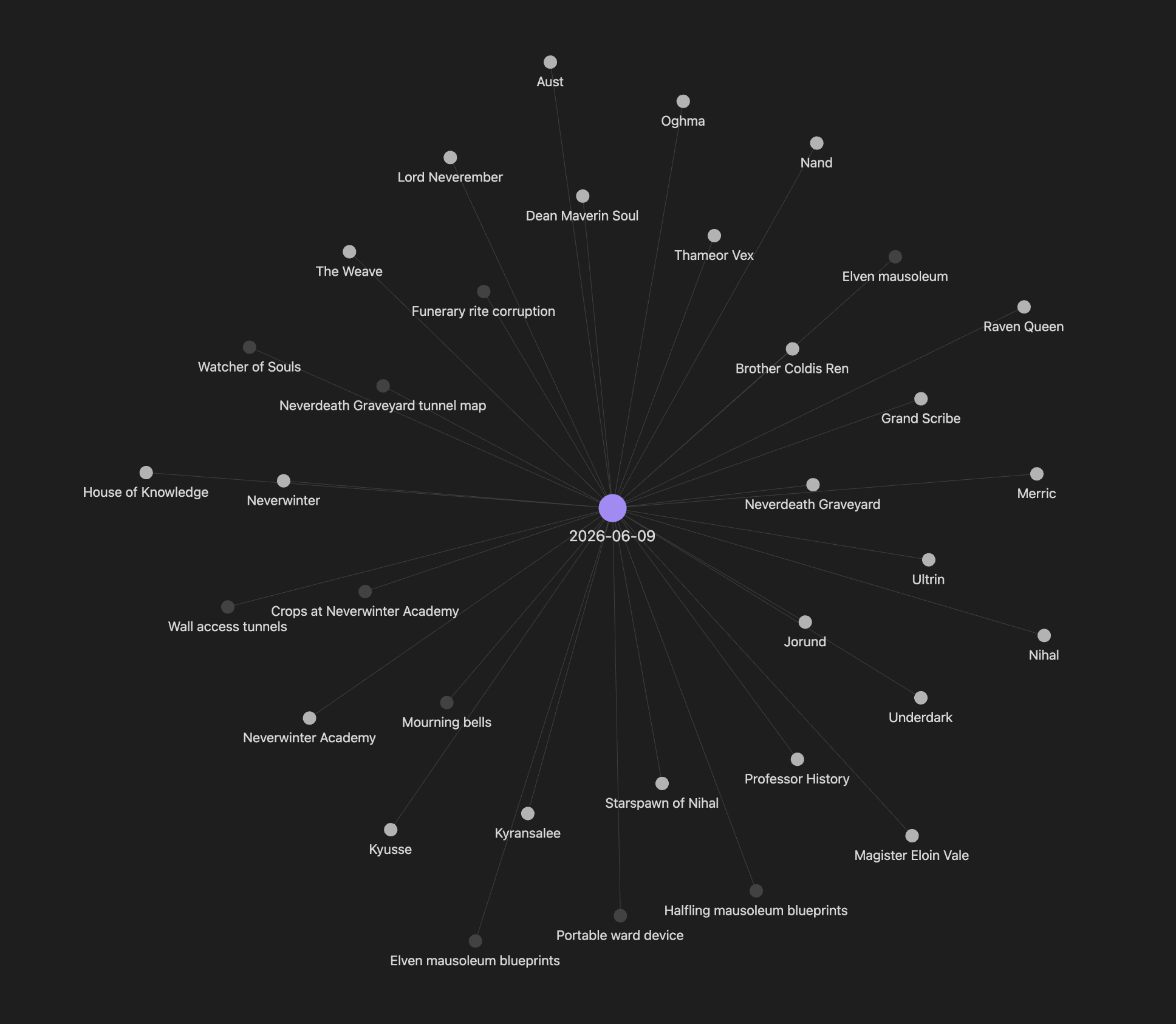 <!-- IN-BODY IMAGE: Obsidian local graph centred on one enriched session note,
showing the entities it links to. This is the [[brackets]] payoff in one picture. -->
<!-- IN-BODY IMAGE: Obsidian local graph centred on one enriched session note,
showing the entities it links to. This is the [[brackets]] payoff in one picture. -->
Why a skill and not a script
The honest answer is that I wanted to see what building with skills was like. This could have been a Python script. It might even have been a better Python script: more testable, easier to version, no dependency on Cowork.
But that’s not quite the point. The interesting thing about building it as a skill is how little there is to build. You write a prompt that describes what you want done to a note. Claude reads the note, synthesises it, and writes the structured output back. The “code” is the SKILL.md file. No parsing logic, no output schema validation, no retry handling. The model just does it.
This is interesting as it moves where the complexity lives. In a traditional script you write code to extract information and format output. Here, that work happens inside the model. The author is doing prompt engineering where they’d once have been doing software engineering. You write a description of what you want, and the model turns it into behaviour.
The trade-offs are real and worth naming. There are no unit tests for a skill. You can eval it, but you can’t mock the model. Behaviour can drift between model versions with no code change at all. Against that: it’s fast to build and easy to iterate, and changing the output format is a one-line edit.
I built this myself, and I’d have been comfortable writing the script. The part that stays with me is that I didn’t have to. The whole thing is a SKILL.md file written in plain English, which means the person who’d benefit most from this isn’t me. Someone who runs a game, keeps notes in Obsidian, and has never written a line of Python could build the same thing by describing what they want. That’s a genuinely different distribution of who gets to automate their own work, and it’s worth more than the time it saved me.
None of this means code is dead or that skills replace software. It means there’s a different kind of building available now, and this is a clean small example of what it looks like. The logic that used to sit in scaffolding around the model now sits inside it.
The chain
The skill doesn’t run on its own. There are three, and they run in sequence:
- Enrich. The enrichment skill reads the note and patches the structured blocks in.
- Git sync. A second skill copies the enriched note to a separate git repo, adds a header, commits, and pushes.
- Telegram notify. A third posts the recap and open threads to the campaign channel.
Each is a separate skill, and they can run individually or chained in a single instruction. “Enrich the latest session, update git, and post to telegram” runs all three. Each could be its own post, so I’ll leave them there. The notes are only the visible part. The enrichment is where a longer chain of automation starts.
What’s next
That’s the data quality problem dealt with. The notes that feed the House of Knowledge are now consistent, tagged, and filterable, which really matters for what comes next.
The next post is about whether any of this actually works. So far the whole series has been building things and asserting they’re good. Part 5 is the test set: a proper query set and a way to score retrieval, built before I see the results rather than after. I was just going to vibe it all but then I stopped myself. Think of the ~content~ learning opportunities.